

How to Hide Cables Under Desk: A 2026 Guide
Table of Contents
- Why Hiding Cables Under Your Desk Matters
- What You'll Need Before You Start
- How to Organise Desk Cables Without Drilling
- Best Cable Management Tools for Desks
- How to Hide Power Strips Under Desk
- Common Mistakes to Avoid
- Maintaining Your Cable Setup
- Frequently Asked Questions
Last Updated: 2 October 2026
Why Hiding Cables Under Your Desk Matters
A cluttered desk with tangled cables isn't just an eyesore, it creates real problems. Loose cables are trip hazards. They collect dust and can overheat. They make it harder to find the right plug when you need it. Hiding cables under desk keeps your workspace safe, clean, and professional-looking.
Whether you're working from home or managing an office setup, cable management matters. A tidy desk helps you focus. It also protects your equipment and extends cable lifespan by reducing strain and damage.
The good news: you don't need to drill holes or hire an electrician. Simple, practical solutions work just as well. At Just Tape, we provide reusable ties and adhesive solutions that secure cables without permanent damage.

What You'll Need Before You Start
Before you hide cables under desk, gather these essentials:
- Reusable cable ties, hook-and-loop straps that grip cables without cutting off circulation
- Adhesive tape, self-adhesive fasteners for securing ties to desk surfaces
- Cable clips or raceways, optional, but helpful for bundling multiple cables
- Measuring tape, to plan your cable routes
- Scissors, for trimming ties to length
The VELCRO® ONE-WRAP Reusable Ties are ideal for this job. They grip cables securely without damaging them and can be repositioned as needed. The VELCRO® brand hook-and-loop fastening system has been trusted for decades in professional environments because it holds firm without adhesive residue.

You may also want a small torch to see under your desk clearly. Good visibility prevents mistakes and makes the job faster.
How to Organise Desk Cables Without Drilling
The best approach to hide cables under desk is to bundle them together and secure them to your desk frame or underside.
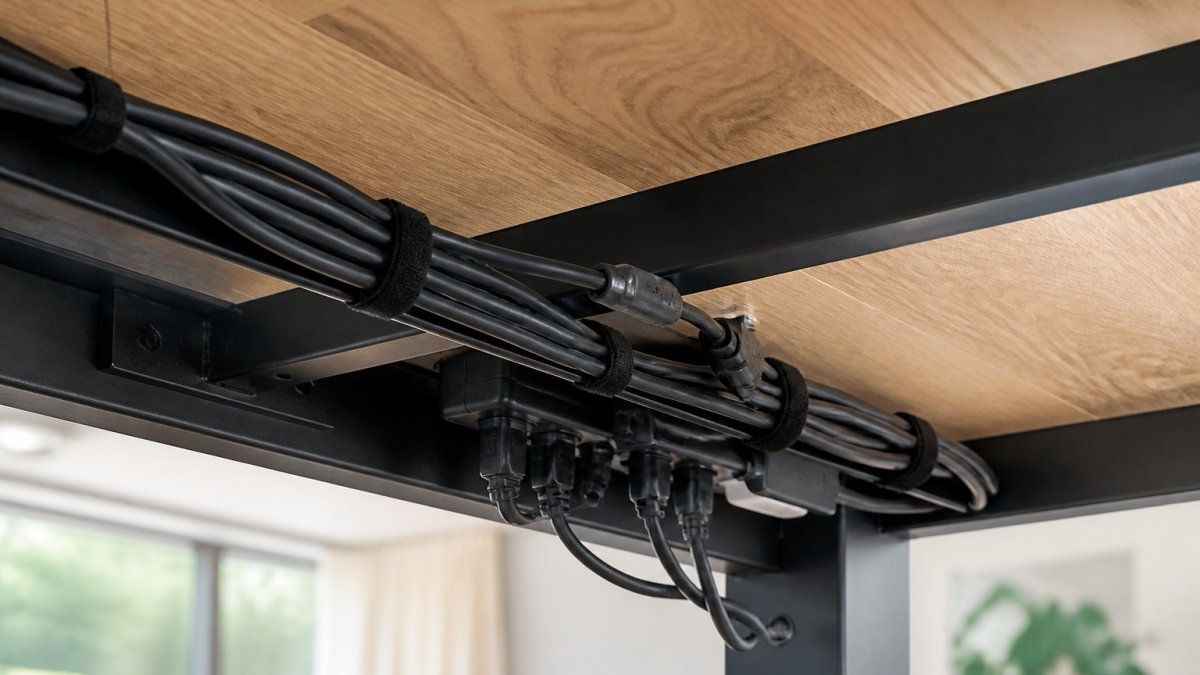
Bundle cables with reusable ties
Start by grouping cables by function. Power cables go together. Data cables (USB, ethernet, HDMI) form another bundle. Audio cables stay separate if possible.
Wrap reusable ties around each bundle. Leave a little slack, cables need room to breathe and flex. Tight wrapping can damage insulation over time. Tie bundles at 30-centimetre intervals along their length for even support.
The VELCRO® ONE-WRAP ties work brilliantly here. Simply wrap them around your cable bundle and press the hook side against the loop side. They grip instantly. Unlike plastic ties, they don't cut into cables or leave marks. You can also reposition them without waste.
Secure cables to the desk underside
Once cables are bundled, attach them to your desk frame or underside. This keeps them from dangling and getting tangled with your feet.
Use self-adhesive hook-and-loop pads or adhesive tape designed for this purpose. The 3M Hook & Loop Self Adhesive Sticky Pads work well, they're heavy-duty. Press the adhesive side firmly to a clean, dry surface and wait 24 hours for full bonding before hanging weight on them.

Run cables along the desk edge or frame, securing them every 30-45 centimetres. This distributes weight evenly and prevents sagging.
Key steps:
- Clean the desk surface with a dry cloth before applying adhesive
- Press the adhesive pad firmly for 10 seconds
- Wait 24 hours before loading cables onto the fastener
Best Cable Management Tools for Desks
Several tools make hiding cables under desk easier and more effective:
Reusable hook-and-loop ties remain the simplest and most flexible option. They cost less than permanent solutions and work on any cable type. The VELCRO® ONE-WRAP Reusable Double Sided Strapping Tape is available in different widths to match your cable bundle size.
Self-adhesive hook-and-loop pads secure ties and cables to surfaces without nails or screws. The 3M Hook & Loop Tape with 3M 9448A Adhesive Backing provides strong hold on smooth surfaces like painted desks, metal frames, and glass. It reaches maximum strength after 24 hours.
Cable raceways are plastic channels that hide cables along desk edges or walls. They're more visible than under-desk routing but neater than loose cables.
Desk cable trays clip under desks and hold multiple cables in organised rows. They work well for setups with many cables.
| Tool | Best For | Permanent | Cost |
|---|---|---|---|
| Reusable ties | Small bundles, frequent changes | No | Low |
| Adhesive pads | Securing bundles to desk | No | Low |
| Cable raceways | Visible cable runs | Yes | Medium |
| Desk trays | Multiple cables, organised storage | Yes | Medium |
For most home and small office setups, reusable ties and adhesive pads are sufficient. They're affordable, reversible, and require no tools or damage to your desk.
How to Hide Power Strips Under Desk
Power strips need special attention because they're bulky and generate heat. Proper placement keeps them safe and your cables organised.
Mount the power strip to the underside of your desk using adhesive-backed fasteners or a small mounting bracket. Position it so air can circulate around it, never enclose it completely. Leave at least 5 centimetres of clearance on all sides.
VELCRO® ONE-WRAP Reusable Double Sided Strapping Tape Hook and Loop →
Use the 3M Hook & Loop Self Adhesive Sticky Pads to secure the power strip. These pads are rated for heavier items. Clean the desk surface thoroughly before application, then press the pad firmly for 10 seconds.
Route cables from the power strip to your devices using the bundling techniques above. This keeps cables organised and prevents the power strip from becoming a tangled mess.
Important considerations:
- Never cover power strip vents with cables or tape
- Keep the power strip away from liquids and moisture
- Don't overload the power strip beyond its rated capacity
If your power strip has a surge protector, ensure it's easily accessible so you can switch it off quickly if needed.
Common Mistakes to Avoid
Many people make the same errors when hiding cables under desk. Learning from them saves time and frustration.
Bundling cables too tightly restricts airflow and can damage insulation. Leave slack in your bundles. Cables need room to flex and breathe.
Using permanent adhesive on expensive equipment makes it impossible to relocate cables later. Stick with removable adhesive solutions like reusable ties and hook-and-loop pads.
Forgetting to label cables creates confusion when you need to unplug something. Use small tags or coloured ties to mark each cable's purpose.
Ignoring heat buildup around power strips and transformers can create fire hazards. Ensure proper ventilation and avoid covering these components with cables or tape.
Applying adhesive to dirty surfaces causes fasteners to fail. Always clean and dry your desk before attaching adhesive pads or tape.
Routing cables across sharp edges damages insulation over time. Use cable clips or soft padding where cables cross desk corners or frame edges.
Overloading a single power strip strains the device and creates safety risks. Distribute your devices across multiple outlets if possible.
Maintaining Your Cable Setup
Once you've hidden cables under desk, a little maintenance keeps everything working smoothly.
Check your cable setup monthly. Look for loose ties, damaged insulation, or cables that have shifted. Reposition any that have moved and retighten loose ties.
Clean dust from cables and power strips every three months. Use a dry cloth or soft brush, never spray liquids near electrical connections. Dust buildup reduces cooling and can cause overheating.
Replace worn reusable ties as needed. The VELCRO® ONE-WRAP ties are durable, but repeated repositioning eventually wears the hook side. Fresh ties cost little and maintain secure bundling.
Update your cable layout when you add new devices. Reroute cables to maintain even spacing and prevent overcrowding in any one area.
Cable management doesn't require expensive tools or permanent modifications. With reusable ties and self-adhesive fasteners, you can hide cables under desk in under an hour and adjust your setup anytime. Just Tape stocks the VELCRO® ONE-WRAP Reusable Ties and 3M Hook & Loop Self Adhesive Sticky Pads you need to keep your workspace organised and safe. Browse our full range of cable management solutions, and we'll dispatch your order within 24 hours. Free Royal Mail 48 delivery applies to orders over £20.
Frequently Asked Questions
Can I hide cables under desk without drilling holes?
Yes. Adhesive-backed hook-and-loop tape and reusable cable ties are your best options. VELCRO® ONE-WRAP ties require no adhesive and leave no sticky residue, making them ideal for renters and those who want to avoid damage. 3M Hook & Loop Tape with 3M 9448A adhesive works well on smooth surfaces like painted wood or metal desk frames. Clean and dry the surface first, press the tape firmly, and wait 24 hours for maximum strength.
What's the difference between adhesive tape and reusable ties for hiding cables?
Adhesive tape secures cables in place. Reusable ties like VELCRO® ONE-WRAP can be wrapped around cables and repositioned repeatedly without damage. For temporary setups or frequent changes, reusable ties work better. For installations where cables won't move, adhesive tape offers stronger security.
How do I hide a power strip under my desk safely?
Position the power strip on a cable tray or mount it to the underside of your desk using adhesive-backed hook-and-loop pads. Ensure the power strip is elevated and has airflow to prevent overheating. Use cable ties to bundle power leads neatly so they don't tangle or create trip hazards. Never cover a power strip completely or block its ventilation slots. Keep the power switch accessible.
Is it safe to bundle multiple power cables together?
Bundling power cables is safe if done correctly. Use reusable ties or cable sleeves rather than tight knots, which can damage insulation. Avoid bundling too many high-power cables in one spot, as this can generate heat. Leave gaps for air circulation and don't compress cables too tightly. Inspect regularly for damage to insulation, and replace any cables showing wear.